Black Friday ends soon! Save up to 63%!
Shop now

Why you'll love Clicks.

1
Feel satisfying real buttons
Pressing real buttons and hearing that little clicking sound feels more natural and rewarding.
Replay
2
Elevated premium protection
Brushed metal side keys, a microfibre lining, and a new enclosure that feels great while adding protection inside and out.
Replay
3
See more screen
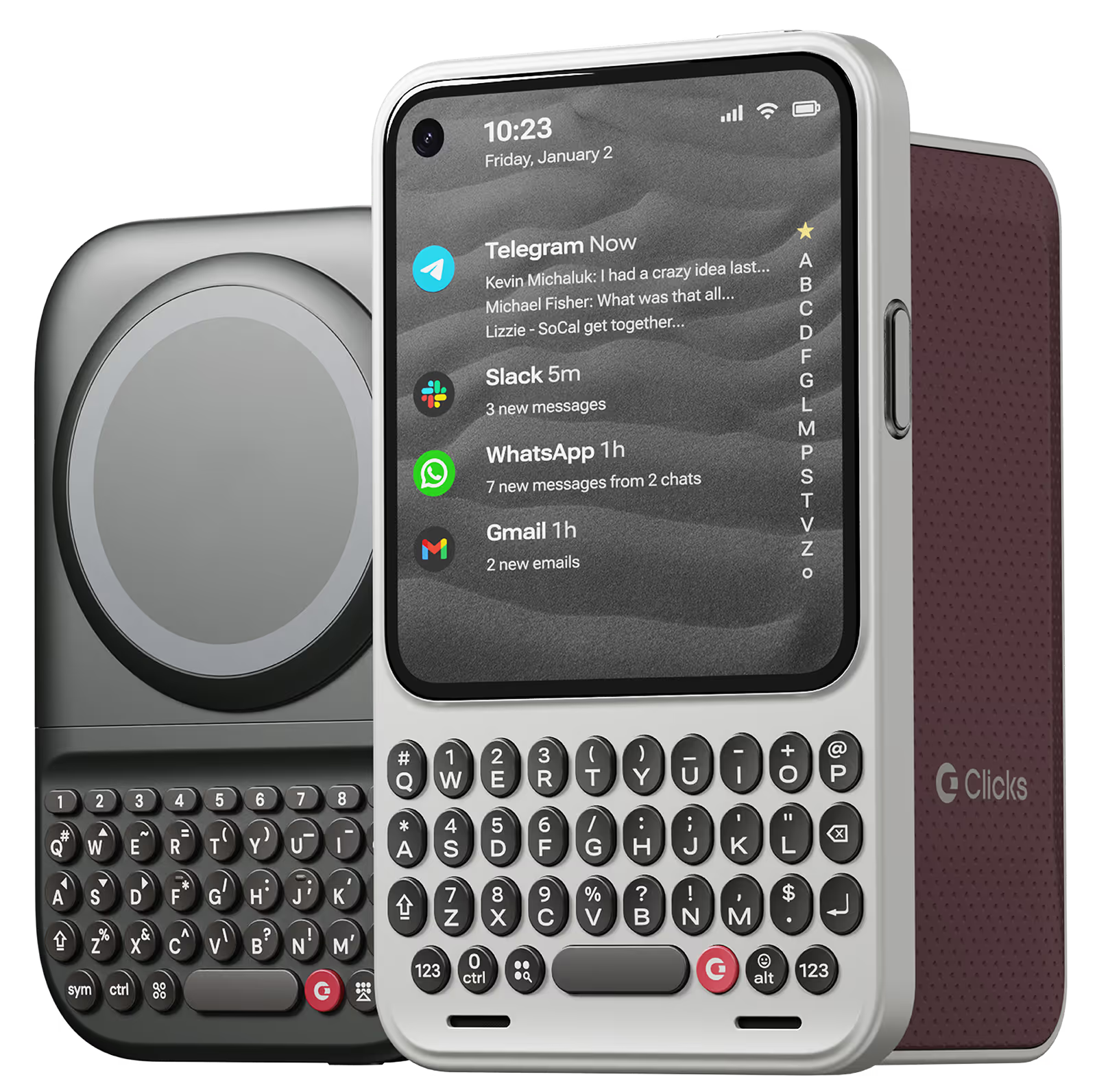
Free your screen, with 50% more usable display to work, play, surf, chat and engage with your content.
Replay
4
Take action, faster
Launch customized shortcuts at the push of a button. Personalize your keyboard to control your home, launch apps, text or call contacts.
Replay
5
Keep your laptop at home
Make more happen right from your phone without needing to crack open your laptop.
Clicks for iPhone
ボタンの利便性でiPhoneのパワーを強化。カラーは4色。
In stock & shipping now.
今すぐ購入
Clicks for Pixel
新しい生産性機能とより大きな表示領域でiPhone 14をアップグレード。
Available now.
今すぐ購入
Clicks for Razr
Pocket-sized. Power-packed.
Available now.
Buy Now

Buttons with benefits.

More Screen

Get 50% more usable display to work, play, surf, chat and engage with your content.

Customizable Shortcuts

Launch custom actions at the push of a button.

Powerful Productivity

Real buttons that help you work smarter while away from your desk.

お客さまの声

209件のカスタマーレビューに基づく
Ian H
Clicks for iPhone 15

Having a real keyboard again is fantastic. I can touch type with so few errors again. The feedback from the buttons is great. The keyboard itself is a perfectly ergonomically designed. A great great all round product.

Visit source
Landon N.
Clicks for iPhone 15 Pro

"A keyboard that is user-friendly and works well in Japanese. Sometimes, the predictive text does not stand out when the background color of the app is the same. Although the body may become larger, using MagSafe-compatible pop sockets can provide stable use. I hope for future updates to include MagSafe compatibility. I have already ordered a second one!"

Visit source
Takamasa M.
Clicks for iPhone 15

The clicks on the keyboard are comfortable and easy to type and I never press the wrong key at all. I have created 42 keyboard shortcuts using iOS shortcuts and Clicks mode, so most of my work is completed using the keyboard alone. However, when using Japanese, there are many cases where "ー" is used in Japanese words, so a separate key is necessary. Also, it would be very inconvenient if there were not an icon to indicate whether the active input language is Japanese or English. If these two points are improved, I believe that the use of the system among Japanese people will increase significantly.

Visit source
Hideki K.
Clicks for iPhone 16 Pro

I used to love the one for iPhone 15 PRO MAX, but it has been improved in many ways. I like it very much.

Visit source
André B.
Clicks for iPhone 15

I have enjoyed using the Clicks "Precision Typing Instrument" immensely - Typing and browsing with "Clicks" is so much more satisfying than typing on glass. It's also beautiful, well built and fits my Iphone 15 perfectly.

Visit source
Porus S
Clicks Keyboard for iPhone 15

Keyboard is great. Very satisfying. Helps with accuracy. Large phone can be impractical. However, the experience trumps lugging the large phone for someone like me. The keys almost act as a fidget toy, miss the old blackberry days. Can't wait for keyboard for my second Razr phone, that I purchased only for his keyboard.

Visit source
John S.
Clicks for iPhone 15 Pro

This Clicks keyboard is a game changer for anyone who types a lot on their iPhone. It's so much faster and easier to type with than the on-screen keyboard, and I love that it has a backlight so I can use it in low-light conditions. The shortcuts and voice input are also great features that I use all the time. Overall, I'm extremely happy with this purchase!

Visit source
Lilly W.
Clicks for iPhone 14 Pro

there is a learning curve and getting your muscle memory will take time but as a former blackberry lover i knew what i was getting into. i have the 14 pro max and it does make my phone huge but it’s always in my hand or my purse so it doesnt bother me much. love being able to use the keyboard to run shortcuts

Visit source
Lancashire Office
Clicks Keyboard for iPhone 16

Love the case, old school blackberry vibes

Visit source
Kristine Chipman
Clicks Keyboard for Razr+ (2024)

Literally took the keyboard out of the box and started using it. No installation required, just start clicking away.

Visit source

Clicks has you covered.
Try for 30 days.

It takes a week or two to get used to typing on real buttons –  you’ll need a little bit of patience and perseverance. Trust our tens of thousands of customers, it’s so worth it!

If it’s just not for you, we’ll give you your money back, no questions asked.